Core Concepts
Glossary
| Resource | Description | API resource |
|---|---|---|
| Business | Represents an organization that sells a subscription-based product through ProAbono. | (not an API Backoffice resource) |
| Segment | A sub-division of a Business with its own currency, billing rules, customers, and offers catalog. | (not an API Backoffice resource) |
| Customer | An end-customer — the recipient and/or buyer of a subscription. | Customers |
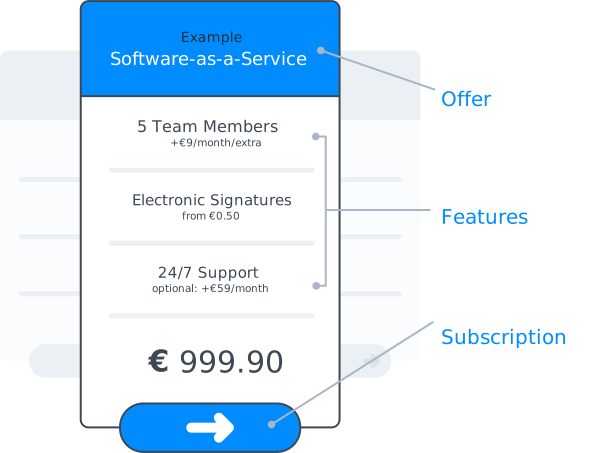
| Offer | A pricing plan. Subscribing a Customer to an Offer creates a Subscription. | Offers |
| Feature | A component of an Offer: on/off (binary access), limitation (non-resetting quota), or consumption (quota reset at each renewal). | Features |
| Subscription | Links an Offer to up to two Customers: a recipient (who consumes the service) and a buyer (who is billed). | Subscriptions |
| Invoice | A billing document. Issued when a subscription starts, and then monthly if there is anything to bill. | Invoices |
| Balance Line | A credit or debit entry that is used to establish the monthly invoice. | Balance Lines |
| Usage | A snapshot of which Features a Customer can access and at what quantity. Updating a usage may trigger a new balance line depending on whether the related feature is paying. | Subscription Features |
| Quoting | A cost estimate for a billing operation (subscribe, upgrade, usage update, etc.) computed before it is executed. | Offer quote, Subscription quote |
Shared identifiers
Developers can assign their own identifiers to link ProAbono resources to counterparts in their own system (e.g. ReferenceCustomer=user-42). If none is provided, ProAbono generates one automatically.
| Resource | Field | Typical use |
|---|---|---|
| Customer | ReferenceCustomer | Mapped to the user or account in the integrating application |
| Feature | ReferenceFeature | Mapped to a protected feature or capability in the application |
| Offer | ReferenceOffer | Used to start a welcome/trial subscription at signup, or for analytics |
| Segment | ReferenceSegment | Used to partition customers by type, region, etc. |
tip
Once set, a shared reference can be used in place of the internal Id in any API Backoffice call targeting that resource.
Next steps
- Conventions — field naming, pagination, dates, amounts, and error shapes